管理用于广告的 cookie,如广告个性化、再营销和广告效果分析。
2.14.1.2.1. Update plugins
Updating plugins is important for ensuring the security of your site and its proper functioning. Both active and inactive plugins should be updated, as even an inactive plugin with vulnerabilities can put the entire site at risk of hacking.
WordPress admin panel
Possible problems:
- Error "No connection to Wordpress.org".
- Error "cURL error 7". The problem is similar to a lack of connection, but it can also occur due to the unavailability of one of the servers to which requests are made to update plugins.
- Open the WordPress admin panel.
- Go to the "Plugins" section.
- Select the plugins you want to update, select "Update" in the "Actions" field, and click "Apply":
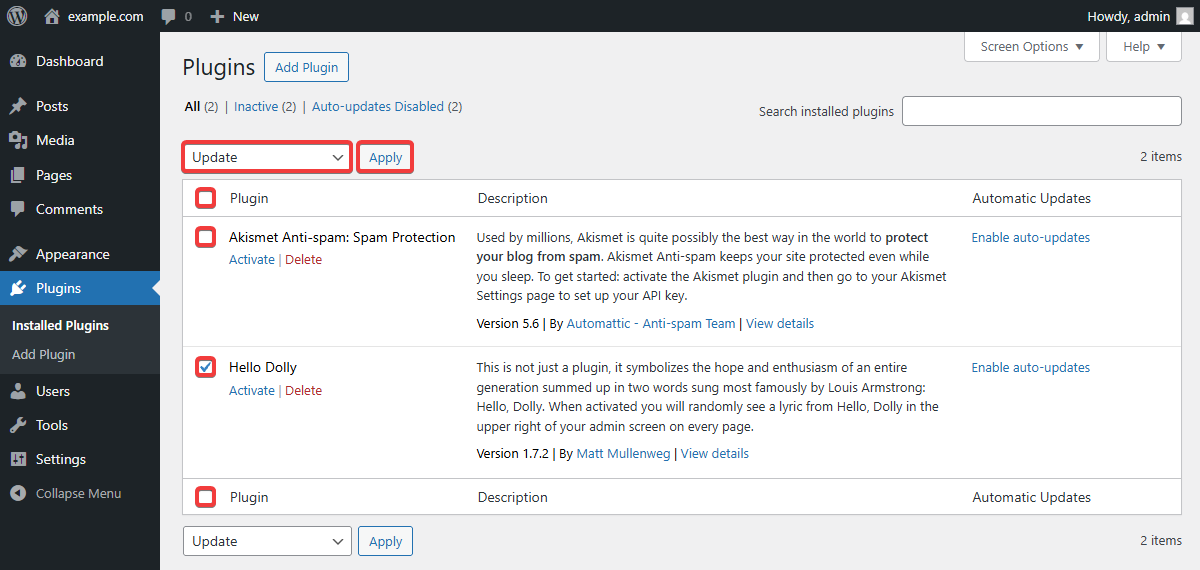
- Each plugin will be updated separately. In case of an error, a notification about update problems will appear.